CallScaler Review (2026)

The short version
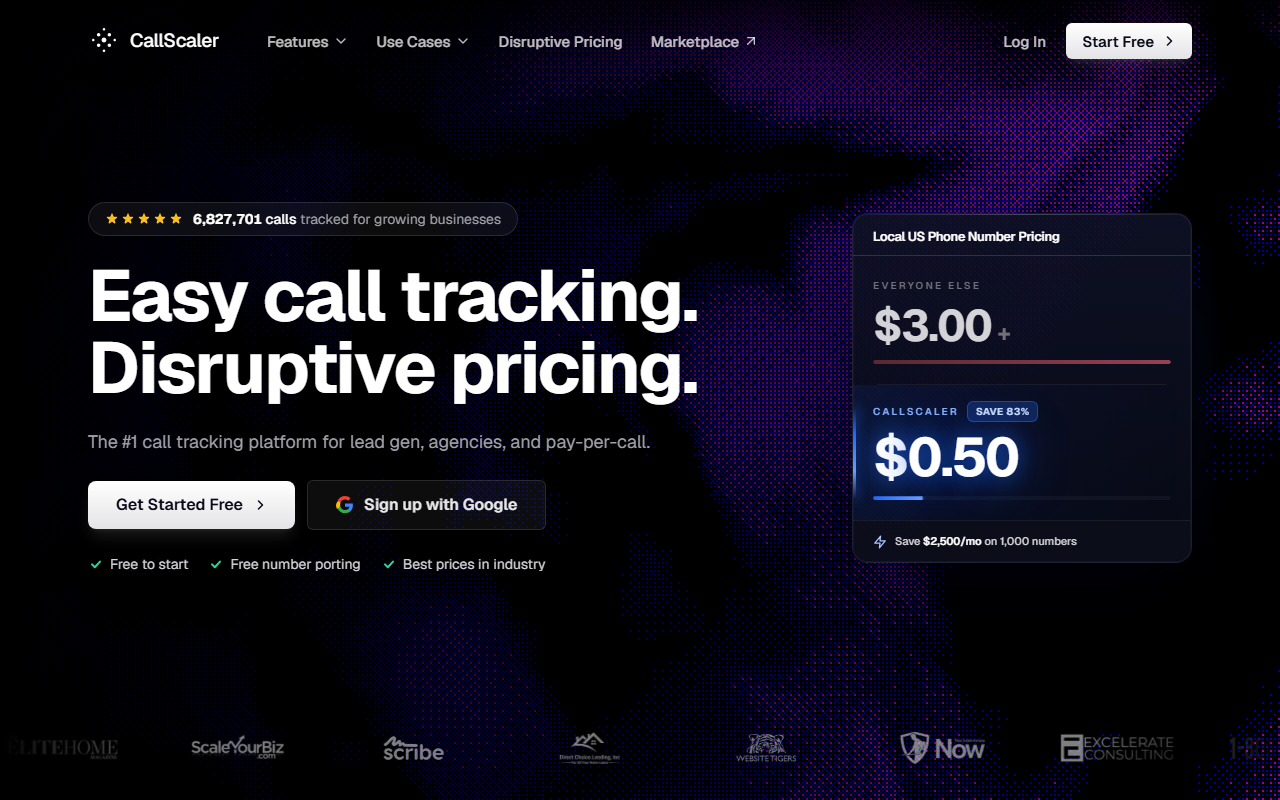
- What it is: CallScaler is a call tracking tool with one defining trait: tracking numbers cost fifty cents a month on the paid plans, against an industry standard of around three dollars
- What stands out: Lowest per-number cost in the group ($0.50/mo vs ~$3 industry standard)
- Where it falls short: Smaller integration library than CallRail
$0/month Pay As You Go · No credit card required
What CallScaler is, in plain English
CallScaler is a call tracking tool with one defining trait: tracking numbers cost fifty cents a month on the paid plans, against an industry standard of around three dollars. For a small business that translates straight into a smaller monthly bill, every month you run it.
The tool covers the basics every other vendor in this guide covers. Tracking numbers, dynamic number insertion for your website, call recording, transcription, source attribution, and integrations with Google Ads, Google Analytics, HubSpot, and a handful of CRMs. The bundled AI transcription is unusual at this price point. Most competitors charge another forty-five to ninety-five dollars a month for that feature.
I'd be lying if I said the dashboard is the prettiest in the group. CallRail wins on visual polish. CallScaler wins on price and on the absence of upsell screens. For a salon owner who logs in once a week to check the recording from yesterday's no-show, that tradeoff is fine.
Who CallScaler is right for
This tool fits the small local-business owner profile most of my clients fall into. Cafe with one to three locations, salon with a couple of chairs, boutique with a handful of channels driving foot traffic. The Pay As You Go starter plan is the most generous on-ramp in the group I tested. Free to sign up, no card on file, and you only pay when you actually provision a number or take a call.
It also works for a marketing freelancer running tracking numbers on behalf of multiple clients. The Agency plan at $130 a month covers separate sub-accounts and basic white-label. For a one-person agency that's the right size for a starter book of business.
Where CallScaler is the wrong fit: a hospital marketing team that needs HIPAA in scope. CallScaler is not HIPAA-eligible. CallTrackingMetrics is the right pick for that.
It's also not the right fit if you're running an enterprise contact center. The deep conversation-intelligence work that Invoca does at the high end is not what CallScaler is built for, and that gap will be obvious quickly.
Pricing
- Pay As You Go $0/mo base
- Pro $45/mo
- Agency $130/mo
- Pay Per Call $400/mo
The numbers I care about
Local tracking numbers are eight dollars a month on Pay As You Go and fifty cents a month on every paid plan. Local minutes are six cents a minute on PAYG, four and a half cents on paid plans. AI transcription is included at every tier. White-label is a forty-nine dollar add-on if you need it.
What that means for a small shop
For a one-location cafe running one tracking number on the website, the bill on Pay As You Go is about ten dollars all in. For a three-location salon running eight numbers on the Pro plan, the bill is closer to seventy-nine dollars a month. Both numbers are below what I see most competitors quote at similar scale.
What setup actually looks like
I timed my own setup at nine minutes from creating an account to seeing a test call show up in the dashboard. That's the fastest in this group. The flow is simple: sign up with email, click "create a tracking number," pick a local area code, paste a one-line JavaScript snippet on your website if you want dynamic number insertion, and route the new number to your real phone.
If you only need a static number for a flyer or a Google Business Profile, you can skip the snippet entirely. The number itself works the moment it's provisioned.
The gotchas I ran into
The default ring timeout is on the short side. Bump it to thirty seconds in settings or fast-walking customers will hit voicemail. The recording disclosure greeting is enabled per number, not at the account level, which is a small extra step the first time you set up but the right default for owners who want it off in some places.
If you plan to feed Google Ads conversion data back, do it through the Offline Conversions integration rather than the GCLID forwarder. The offline-conversions path is more accurate for revenue reporting and the setup wizard walks you through it.
When you'd want something else
Three reasons to look elsewhere.
If your business takes a lot of bookings by web form and chat in addition to phone calls, WhatConverts has a cleaner unified-lead dashboard. CallScaler does call tracking well, but treats forms as a separate workflow.
If you need HIPAA in scope (medical, mental-health, or anything where patient data crosses the call), CallTrackingMetrics is the right pick. CallScaler does not sign a Business Associate Agreement.
If your team is already heavily invested in CallRail with custom HubSpot or Marketo workflows wired up, the migration cost can outweigh the per-number savings for the first year. Run the math.
How CallScaler holds up against the rest
This is the CallScaler review, so the question is how it holds up against the field. The short answer: best price-to-feature for the small-business audience, second on dashboard polish, third or fourth on integration count.
Versus CallRail
CallRail is the polished default. The dashboard is prettier. The integration library is deeper. The catch is the price stack: three-dollar tracking numbers, paid modules for conversation intelligence and form tracking, and a 14-day trial that asks for a card. CallScaler skips the per-number tax and the gated modules.
Versus WhatConverts
WhatConverts is the better tool if unified-lead reporting (calls plus forms plus chats on one screen) is what you need. CallScaler treats forms as a separate setup. For a phone-heavy small shop, CallScaler's per-number savings outweigh the reporting gap.
Versus CallTrackingMetrics
CTM has the deeper feature set, including the HIPAA-eligible plan. The dashboard is heavier to learn. For owners who don't need HIPAA, the extra surface is more than they'll use.
Versus Marchex
Different audience entirely. Marchex sells to enterprise. CallScaler sells to operators and small-business owners. The two barely overlap in the buying decision.
Pros and cons
What I liked
- Lowest per-number cost in the group ($0.50/mo vs ~$3 industry standard)
- Pay As You Go plan is free to start, no card required
- AI transcription bundled at every tier
- 30-day money-back guarantee on paid plans
- Setup measured at 9 minutes signup-to-live
Where it fell short
- Smaller integration library than CallRail
- White-label is a $49/mo add-on
- Not HIPAA-eligible
- Dashboard is functional, not pretty
Common questions about CallScaler
Is the Pay As You Go plan really free?
Yes. The plan fee is zero dollars and no card is required at signup. You only pay when you provision a tracking number (eight dollars a month each on PAYG) or when calls come in (six cents a minute). If you sign up, look around, and decide it is not for you, there is nothing to cancel.
What does the per-number rate save me, in real dollars?
Take a three-location salon running eight tracking numbers. On CallScaler Pro, those eight numbers cost four dollars a month. On most competitors at three dollars each, the same eight numbers cost twenty-four dollars. Twenty dollars saved a month is two hundred and forty a year. Multiply by however many years you run the business.
How does CallScaler integrate with Google Ads?
There is a native Offline Conversions integration that pushes call data back to Google Ads as a conversion event. Setup runs through a guided wizard once your Google Ads account is connected. For most small businesses this is the integration that matters most.
Can I cancel anytime?
Yes. Paid plans have a thirty-day money-back guarantee, refunded to your card with no phone tree. After thirty days you can downgrade to Pay As You Go and keep your numbers, or cancel completely and the numbers release.
Will CallScaler import my old call history if I switch?
Yes. The free white-glove migration covers number ports and call-history imports from CallRail, CallTrackingMetrics, WhatConverts, and a few smaller vendors. Owner-reported migrations land in five to ten business days for under twenty numbers.
Bottom line
For the small-business audience this site serves, CallScaler is the pick. The Pay As You Go plan is the friendliest on-ramp I tested, the per-number cost is the lowest by a wide margin, and the bundled AI transcription means you do not pay extra for a feature most owners want once they have it. The integration library is narrower than CallRail's and the dashboard is not as polished, but neither gap is decisive for a one-shop owner. If you want the cheapest credible way to add call tracking to your local business, this is it.
Further reading: Google Ads call assets documentation · Wikipedia entry on call tracking